
Core Concepts: Scheduling & Automation
One of the most powerful features of CampaignBay is its ability to automatically start and stop your campaigns based on a schedule. This "set and forget" system allows you to plan your sales calendar in advance, ensuring your promotions run with precision.
This guide explains how the automation engine works.
How Scheduling Works
The automation in CampaignBay is entirely controlled by the Enable Schedule checkbox and the associated Start Time and End Time fields found in the campaign sidebar.
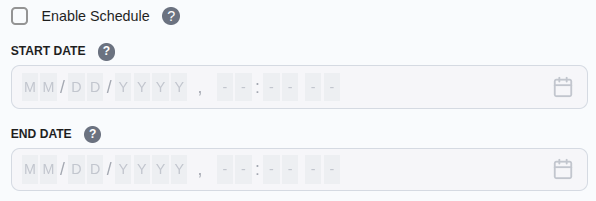
The Two States
Your campaign's eligibility is determined by the relationship between its main status and its schedule:
Status: Active + Schedule: OFF
- The campaign runs indefinitely. It is always eligible to apply discounts until you manually change the status to Inactive.
Status: Active + Schedule: ON
- The campaign only applies discounts between the defined Start Time and End Time.
- If the current time is before the Start Time, the campaign name will appear with a Scheduled label in the list view.
- If the current time is after the End Time, the campaign name will appear with an Expired label in the list view.
Proactive Planning
You can set up your entire month's promotions in one sitting by creating multiple campaigns, setting them to Active, and enabling their specific schedules.
The Automation Engine: Built for Reliability
CampaignBay uses a robust, two-part system to ensure your campaigns always run on time without requiring manual intervention.
1. WordPress Cron Events
When you save a campaign with Enable Schedule turned on, CampaignBay schedules automated tasks with WordPress. These "cron jobs" are designed to trigger at the precise moment your campaign is due to start or expire.
2. The CampaignBay Failsafe
We understand that on some hosting environments, the WordPress Cron system might be unreliable. To solve this, CampaignBay includes a powerful failsafe mechanism that is always working for you in the background.
Every time a customer interacts with your store (adding to cart, visiting a product page, etc.), our system performs a lightning-fast check on active schedules. If it finds any campaign where a scheduled time was missed (e.g., because a cron job didn't fire), it will immediately correct the campaign's behavior.
Peace of Mind
This built-in failsafe guarantees that your discounts will always be accurate and your sales will run on time, regardless of your server's background task configuration.
Important Tips
- Timezone Information: All dates and times are based on the timezone you have configured in your main WordPress settings (Settings → General → Timezone).
- Manual Overrides: You can always instantly stop a scheduled campaign by simply toggling its main status to Inactive.
Now that you understand how scheduling works, learn how to add specific rules to restrict who can use your discounts.